There are three ways in which games can be incorporated into the classroom: students playing games for learning, gamification of learning and through students designing and programming their own games.
The playing of appropriately selected Commercial Off the Shelf (COTS) games as a pedagogical tool has potential benefits and disadvantages. For example, having students do a probability or physics lesson using the game Portal, has the benefit of being enjoyable, interactive, provides instant feedback and allow students to experiment with choices and consequences in a low-stakes environment (Simkova, 2014). However, the process of selecting games is consequential as there must be a balance between the enjoyability of a game and its educational content, because an imbalance of either does not engage students or have any value as a learning experience (Virvou & Katsionis, 2008).
Gamification, on the other hand, is about incorporating the mechanics and elements of games into the classroom setting as a motivational and engagement tool (Nah et al., 2013). Some examples of gamification are the Class Dojo system where students earn trackable points for positive behaviour and BadgeStack where teachers can create quests and badges for student achievement. Framing elements of learning as a game may lead to higher motivation, give continual feedback and demonstrate that failure is a necessary part of the learning experience (Su & Cheng, 2014). Some potential challenges in implementing gamification are that it does not work in motivating all students, does not intrinsically motivate learning and turns the voluntary nature of games into an obligatory task, thus demotivating some students (Jagušt, Botički & So, 2018).
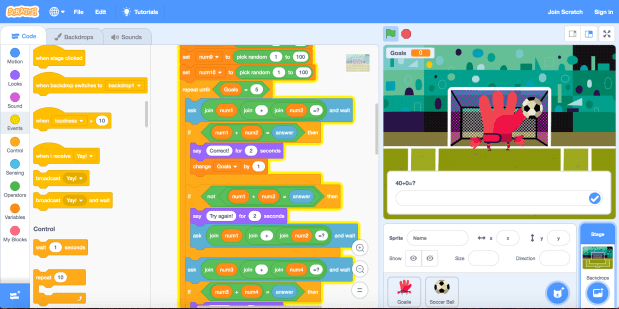
The final approach is students as designers, in which students plan, design and program their own games as a learning experience of its own, or interwoven with other KLAs. In incorporating elements of design and computational thinking, students create a product that is fun to use, learn more about the curriculum concepts and principles of games (such as the setting of goals and having an element of challenge), as well as develop 21st century skills such as collaboration (Prensky, 2007). Scratch is a tool that allows young students to become game designers with easy-to-use features and tutorials. Play the maths game I made in Scratch here.
Reference List
Jagušt, T., Botički, I., & So, H. (2018). Examining competitive, collaborative and adaptive gamification in young learners’ math learning. Computers & Education, 125, 444-457.
Nah, F. F., Telaprolu, V. R., Rallapalli, S., & Venkata, P. (2013). Gamification of Education Using Computer Games. Lecture Notes in Computer Science (including Subseries Lecture Notes in Artificial Intelligence and Lecture Notes in Bioinformatics), 8018(3), 99-107.
Prensky, M. (2007). Students as designers and creators of educational computer games. Retrieved from: http://www.marcprensky.com/writing/Prensky-Students_as_Game_Creators-.pdf
Simkova, M. (2014). Using of Computer Games in Supporting Education. Procedia – Social And Behavioral Sciences, 141, 1224-1227.
Su, C., & Cheng, C. (2014). A mobile gamification learning system for improving the learning motivation and achievements. Journal Of Computer Assisted Learning, 31(3), 268-286.
Virvou, M., & Katsionis, G. (2008). On the usability and likeability of virtual reality games for education: The case of VR-ENGAGE. Computers & Education, 50(1), 154-178. doi: 10.1016/j.compedu.2006.04.004

