Week 12 – Constructionism and the Maker Movement: Students Shaping Their Worlds

The Maker Movement is all about learning through the experimental processes of building, tinkering and designing (Hsu, Baldwin & Ching, 2017). In a way, maker education is a culmination of all the technologies discussed throughout this blog, as 3D printers, robotics, artificial, virtual and augmented reality are all tools that can be used in the process of making, in addition to everyday objects and commercial kits (Martinez & Stager, 2014).

While relatively modern, the maker movement is based on theoretical concepts dating back to the early 20th century. The first one is Dewey’s hands-on approach to education in which learning is not a static exchange but a dynamic process of learning by doing (Clapp, Berger & Donner, 2016). The other is Papert’s theory of Constructionism, in which learning occurs through the building of physical artefacts (Donaldson, 2014). In making, students are actively constructing knowledge of the curriculum content, manifesting a physical representation of their thinking and creating a sharable, contextualised object (Cohen, et al., 2017).
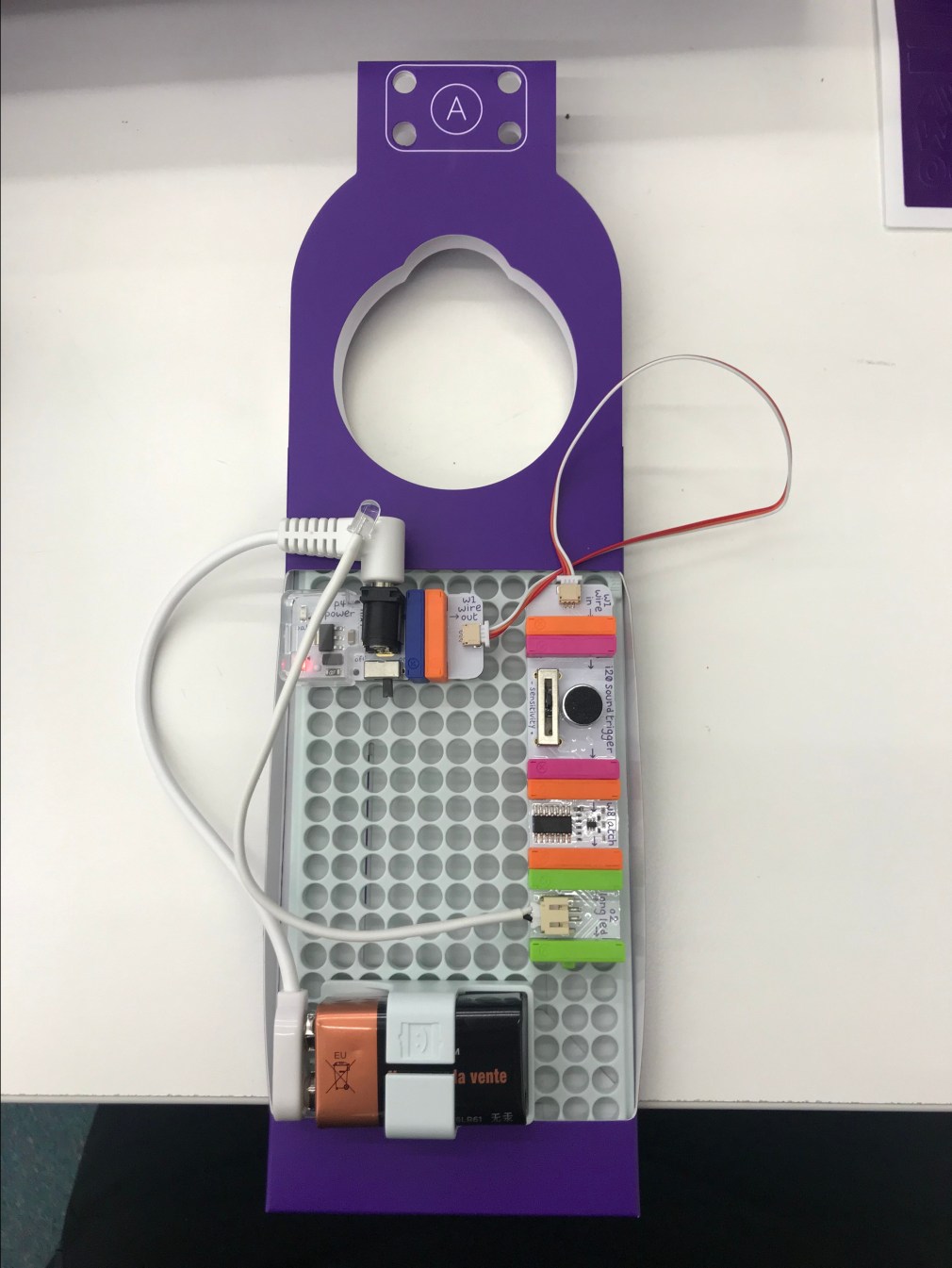
img_7836.jpg
Making a ‘Stuff Protector’ which is a doorknob attachment that senses sounds from intruders and, triggers the LED light and buzzer using the LittleBits kit

There are many benefits in incorporating maker education into the classroom. Making fosters higher order thinking skills, including the synthesis domain of Blooms Taxonomy in which students create, design and invent as a way of making sense of new ideas (Donaldson, 2014.) Additionally, making supports self-directed, autonomous learners as students are often responsible for their own work within the parameters of set learning objectives (Cohen etal., 2017). Making, by nature, is creative and customisable and as such, educators are able to tailor the learning experience to fulfil certain purposes, for example inclusivity by accomodating for student needs and interests to bridge participation gaps for certain groups (Harvard Educational Review Editorial board, 2014).
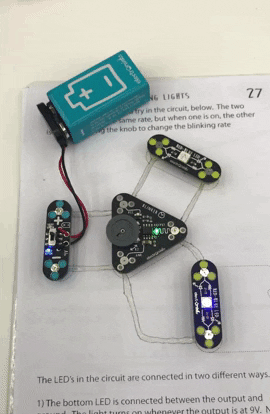
circuitscribe
Students create their own circuits using CircuitScribe’s conductive ink

There are many examples of the maker movement in action due to the wide availability of kits and tools. Educators may choose to use commercial kits such as the CircuitScribe, Little Bits that have less scope in order to serve a specific learning objective, for example the CircuitScribe contains conductive ink to allow students to learn more about circuits. Alternatively, teachers may opt to design lessons that allow students to have more freedom with their making – in just setting a learning objective, outlining parameters and providing access to resources. For example, setting a maker project designing e-textiles where electronic components are embedded into clothing products, or my example below which is creating a functional fan using the micro:bit and a motor (Hsu, Baldwin & Ching, 2017).
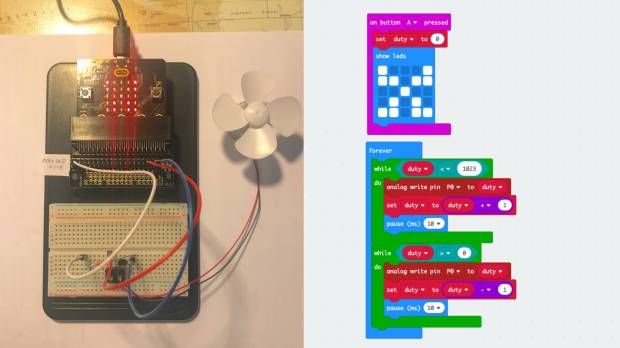
fan.jpg
Making a functional fan using the micro:bit, a breadboard and a motor. Credit: Kitronik

Reference List

Clapp, E., Berger, R., & Donner, W. (2016). Maker-centered learning (1st ed.). San Francisco: Jossey-Bass.

Cohen, J., Jones, W.M., Smith, S., & Calandra, B. (2017). Makification: Towards a Framework for Leveraging the Maker Movement in Formal Education. Journal of Educational Multimedia and Hypermedia, 26(3), 217-229.

Donaldson, J. (2014). The Maker Movement and the rebirth of Constructionism. Hybrid Pedagogy. Available at: http://www.hybridpedagogy.com/journal/constructionism-reborn/

Harvard Educational Review Editorial Board. (2014). The maker move-ment in education: Designing, creating, and learning across con-texts.Harvard Educational Review, 84(4), 492–494 Retrieved from http://hepg.org/her-home/issues/harvard-educational-review-volume-84-number-4/herarticle/symposium.

Hsu, Y., Baldwin, S., & Ching, Y. (2017). Learning through Making and Maker Education. Techtrends61(6), 589-594.

Martinez, S., & Stager, G. (2014). The maker movement: A learning revolution. International Society for Technology in Education. Available at: https://www.iste.org/explore/articleDetail?articleid=106
Week 11 – Games: Students as Players and Designers

There are three ways in which games can be incorporated into the classroom: students playing games for learning, gamification of learning and through students designing and programming their own games.

The playing of appropriately selected Commercial Off the Shelf (COTS) games as a pedagogical tool has potential benefits and disadvantages. For example, having students do a probability or physics lesson using the game Portal, has the benefit of being enjoyable, interactive, provides instant feedback and allow students to experiment with choices and consequences in a low-stakes environment (Simkova, 2014). However, the process of selecting games is consequential as there must be a balance between the enjoyability of a game and its educational content, because an imbalance of either does not engage students or have any value as a learning experience (Virvou & Katsionis, 2008).

Gamification, on the other hand, is about incorporating the mechanics and elements of games into the classroom setting as a motivational and engagement tool (Nah et al., 2013). Some examples of gamification are the Class Dojo system where students earn trackable points for positive behaviour and BadgeStack where teachers can create quests and badges for student achievement. Framing elements of learning as a game may lead to higher motivation, give continual feedback and demonstrate that failure is a necessary part of the learning experience (Su & Cheng, 2014). Some potential challenges in implementing gamification are that it does not work in motivating all students, does not intrinsically motivate learning and turns the voluntary nature of games into an obligatory task, thus demotivating some students (Jagušt, Botički & So, 2018).

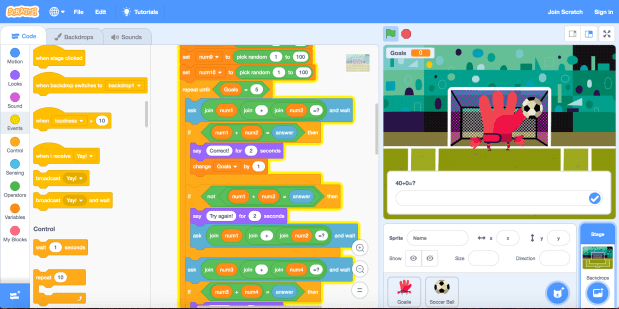
The final approach is students as designers, in which students plan, design and program their own games as a learning experience of its own, or interwoven with other KLAs. In incorporating elements of design and computational thinking, students create a product that is fun to use, learn more about the curriculum concepts and principles of games (such as the setting of goals and having an element of challenge), as well as develop 21st century skills such as collaboration (Prensky, 2007). Scratch is a tool that allows young students to become game designers with easy-to-use features and tutorials. Play the maths game I made in Scratch here.

Screen Shot 2019-06-17 at 5.50.24 am.png
Students can become game designers using Scratch


Reference List

Jagušt, T., Botički, I., & So, H. (2018). Examining competitive, collaborative and adaptive gamification in young learners’ math learning. Computers & Education125, 444-457. 

Nah, F. F., Telaprolu, V. R., Rallapalli, S., & Venkata, P. (2013). Gamification of Education Using Computer Games. Lecture Notes in Computer Science (including Subseries Lecture Notes in Artificial Intelligence and Lecture Notes in Bioinformatics), 8018(3), 99-107.

Prensky, M. (2007). Students as designers and creators of educational computer games. Retrieved from: http://www.marcprensky.com/writing/Prensky-Students_as_Game_Creators-.pdf

Simkova, M. (2014). Using of Computer Games in Supporting Education. Procedia – Social And Behavioral Sciences141, 1224-1227.

Su, C., & Cheng, C. (2014). A mobile gamification learning system for improving the learning motivation and achievements. Journal Of Computer Assisted Learning31(3), 268-286.

Virvou, M., & Katsionis, G. (2008). On the usability and likeability of virtual reality games for education: The case of VR-ENGAGE. Computers & Education50(1), 154-178. doi: 10.1016/j.compedu.2006.04.004

Week 7 – Virtual Reality: Immersing Students Into Other Worlds

Virtual Reality (VR) is the experience of being immersed in a simulated, interactive environment; the perspective, level of immersion and realism changing depending on the tool (Hedberg & Alexander, 1994). In addition to filtering into the classroom context, this technology has also been used in gaming, social media and training in industries like aviation and medicine (Kavanagh, et al., 2017; Southgate, 2018).

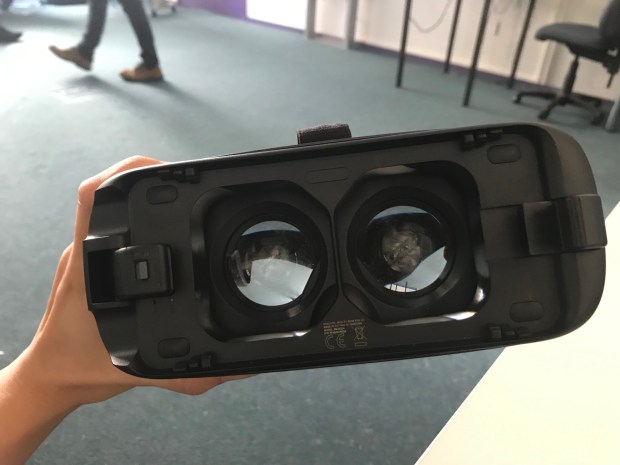
There are two different types of VR technologies: desktop VR and wearable VR. Desktop VR technologies include games like The Sims and simulated worlds like Second Life, in which the sense of presence does not come from the proximity, but rather the level of interaction and the way that the world represents reality (Hedberg, Harper & Dalgarno, 2002). The main benefits to this type of technology is that it is a more financially viable option to wearable alternatives while still presenting students with educational benefits such as reducing cognitive load, increasing spatial visualisation and allowing interaction (Lee & Wong, 2014). Alternatively, wearable VR such as Google Cardboard, Oculus Rift and Samsung Gear are head-mounted devices that range in price, experiences available and capabilities (Southgate, 2018).

IMG_7692.jpg
Users load different worlds onto a Samsung mobile phone and view them using the Samsung Gear headset

Allowing students to experience VR in any of these forms may have potential benefits. A study of students immersed in an interactive VR experience where they were able to manipulate scientific concepts such as gravity and friction, showed those students having better retention and understanding of those concepts than their peers who learned the same content via lecture (Allison & Hodges, 2000). Additionally, incorporating VR into the classroom context has many socio-emotional benefits such as potential in increasing self-efficacy and confidence, encouraging perspective-taking and empathy, as well as allowing children to improve their social cognition (Bailey & Bailenson, 2017). However, educators should take care to consider potential issues as well such as privacy concerns, students disengaging with reality and distraction (Southgate, 2018).

IMG_7691.jpg
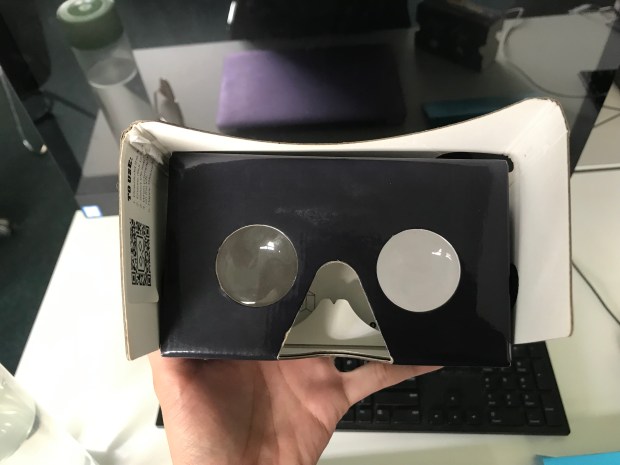
Cheaper alternatives such as the cardboard CommBank ‘Teleporter’ device still have some educational value

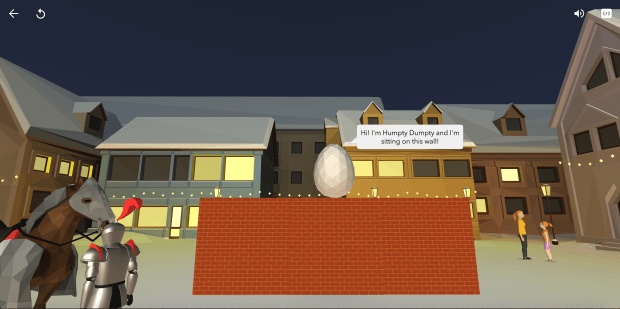
However, much like the discussion of AR in the previous post, students are engaged in more higher order thinking skills when they are designing their own experiences. A platform such as CoSpaces allows students to design their own AR world using the backdrops and characters provided, as well as program their characters to do certain actions (incorporating the skills of computational thinking) and then load these worlds onto a viewing device such as a mobile phone. This types of design activity not only has potential for incorporation in all learning areas, but is also strongly linked to the engaging, interactive nature of constructivism (Kavanagh et al., 2017).

Screen Shot 2019-06-16 at 10.50.49 pm.png
VR World Made in CoSpaces depicting the story of Humpty Dumpty (potential links to English, Creative Arts KLAs)

Reference List

Allison, D., & Hodges, L. (2000). Virtual reality for education? Proceedings of the ACM Symposium on Virtual Reality Software and Technology, 129(135), 160-165.

Bailey, J., & Bailenson, J. (2017). Considering virtual reality in children’s lives. Journal Of Children And Media11(1), 107-113.

Hedberg, J., & Alexander, S. (1994). Virtual Reality in Education: Defining Researchable Issues. Educational Media International31(4), 214-220.

Hedberg, J., Harper, B. & Dalgarno, B. (2002). The contribution of 3D environments to conceptual understanding. In O. J. McKerrow (Eds.), Winds of Change in the Sea of Learning: Proceedings of the 19th Annual Conference of the Australasian Society forComputers in Learning in Tertiary Education Vol 1 (pp. 149-158). Auckland, New Zealand: UNITEC, Institute of Technology.

Kavanagh, S., Luxton-Reilly, A., Wuensche, B., & Plimmer, B. (2017). A systematic review of Virtual Reality in education. Themes in Science and Technology Education, 10(2), 85-119.

Lee, E., & Wong, K. (2014). Learning with desktop virtual reality: Low spatial ability learners are more positively affected. Computers & Education79, 49-58.

Southgate, E. (2018). Immersive virtual reality, children and school education: A literature review for teachers. DICE Report Series Number 6. Newcastle: DICE Research. Retrieved from http://dice.newcastle.edu.au/DRS_6_2018.pdf 

Week 6 – Augmented Reality: Enhancing the Existing Environment

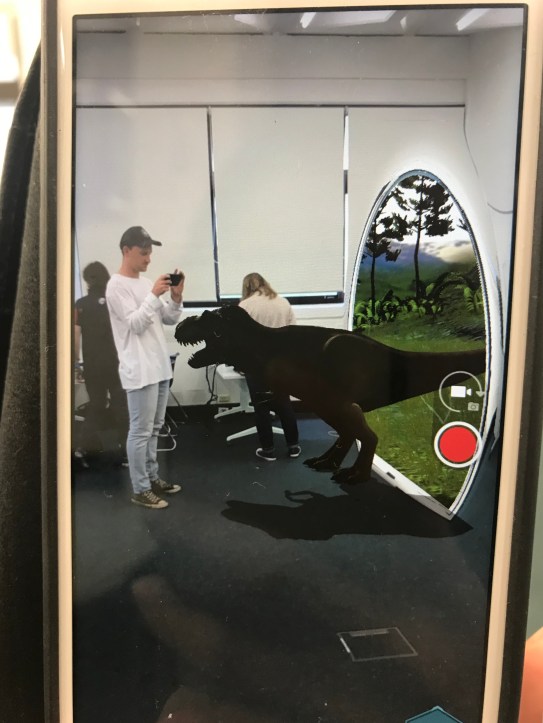
Augmented Reality (AR) is defined as the overlaying of media such as images, text, and video over a trigger image, to enhance the existing environment (Wu, Lee, Chang & Liang, 2013). As it currently stands, AR is used by educators to teach in creative ways as well as incorporated to foster creativity with students as users, and both approaches have their places in the classroom (O’Shea, 2011).

IMG_7682.jpg
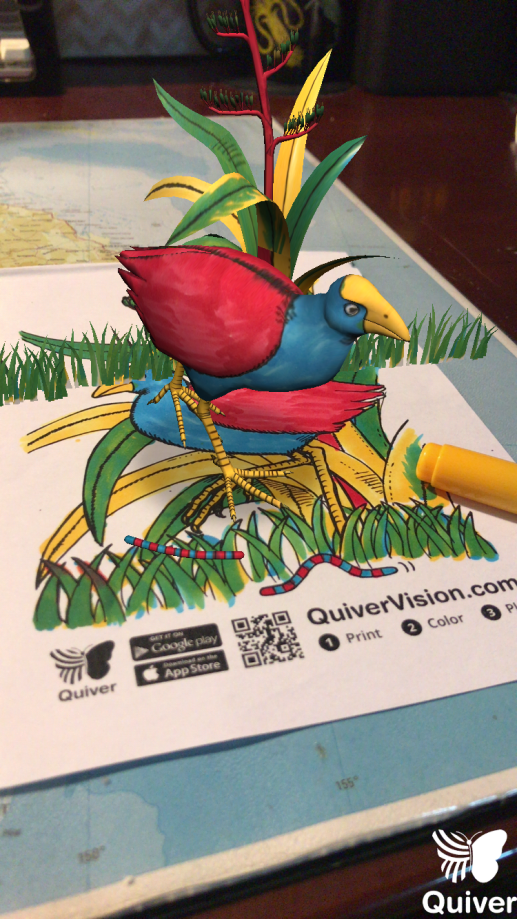
There’s a dinosaur in the classroom!

The first approach is teacher-as-designer, while not as directly promoting of creativity as student-as-designer, still has many educational benefits and uses. One way that educators can use AR to teach creatively, is just through the viewing of previously static 2D mediums in a now dynamic way (Kesim & Ozarslan, 2012). For example, apps like Quiver which provides interactive, printable colouring pages or books like this that represent obscure concepts such as the inside of the human body. These tools may be used as a starting point for further learning with AR.

IMG_7934.png
Simple colouring-in activities are now enhanced with AR apps like Quiver

Educators may also design learning experiences centred around AR that go beyond just play. Location-based AR apps like FreshAiR could be incorporated into a class excursion where students use a mobile device to point at trigger locations to view information and prompts for activities, for example measuring the water quality at a pond (Kamarainen et al., 2013). The obvious limitation is that these tools don’t foster creativity within students directly, however still promote an interactive classroom, and allow students to have authentic learning experiences that align with the immersive, context-based principles of the situated learning theory (Dunleavy, Dede & Mitchell, 2009).

The other approach is student-as-designer, in which students have the opportunity to use platforms such as ZapWorks to design their own AR experiences. Allowing students to be designers has a wide range of advantages, including fostering higher order thinking skills such as evaluating and creating, encourages deeper understanding of intended concepts and has links to higher motivation and engagement in learning (Bower, Howe, McCredie, Robinson & Grover, 2014). AR technology can be woven into lessons across the curriculum in learning areas like Maths, Science and HSIE, however there are some potential consequences such as cognitive overload in having to learn how to design in AR as well as engaging with the content – all of which can be alleviated with appropriate planning and management (Dunleavy, Dede & Mitchell, 2009).

Reference List

Bower, M., Howe, C., McCredie, N., Robinson, A., & Grover, D. (2014). Augmented Reality in education – cases, places and potentials. Educational Media International51(1), 1-15.

Dunleavy, M., Dede, C., & Mitchell, R. (2009). Affordances and Limitations of Immersive Participatory Augmented Reality Simulations for Teaching and Learning. Journal of Science Education and Technology, 18(1), 7-22.

Kamarainen, A., Metcalf, S., Grotzer, T., Browne, A., Mazzuca, D., Tutwiler, M., & Dede, C. (2013). EcoMOBILE: Integrating augmented reality and probeware with environmental education field trips. Computers & Education68, 545-556.

Kesim, M., & Ozarslan, Y. (2012). Augmented Reality in Education: Current Technologies and the Potential for Education. Procedia – Social And Behavioral Sciences47, 297-302.

O’Shea, P. (2011). Augmented Reality in Education. International Journal Of Gaming And Computer-Mediated Simulations3(1), 91-93.

Wu, H., Lee, S., Chang, H., & Liang, J. (2013). Current status, opportunities and challenges of augmented reality in education. Computers & Education62, 41-49.

Week 5 – Robotics: Representing Student Thinking

The rise of robotics in the primary classroom setting can be attributed to the societal need for more technologically-minded learners, and the usefulness of robotics in teaching complex, abstract concepts in an observable, hand-on way (Jung & Won, 2018). However, robotics education needs careful consideration of pedagogical theory, curriculum needs and appropriately-selected tools, to foster deep learning (Alimisis, 2012).

Because of the different types of educational robotics technologies, there are a range of ways that robotics can foster creativity. For example, tools such as the Ozobot and Beebot teach problem-solving, programming and understanding the human world in a creative way (Bers, Seddighin & Sullivan, 2013). These types of tools have success in teaching students as young as 7, STEM concepts, however don’t have much opportunity for construction of their own programs beyond the coding of paths (Friebroon Yesharim & Ben-Ari, 2017).

Robotics kits also increase in complexity and as such have more room for fostering creativity in its use. LEGO has developed a number of kits that contain build-able parts such as blocks and sensors, as well as software that can be used to program these parts (Savard & Freiman, 2016). Veselovská and Mayerová’s (2017) study highlighted the use of the LEGO WeDO in cross-curricular activities such character design in Literacy and creating models in Science, however it is also recommended to place parameters on student projects (e.g. Robot must contain at least 1 sensor) and not solely rely on constructionist pedagogy (instead, begin with explicit teaching and then progress to more constructionist) to prevent the learning of misconceptions.

A medium between the simplicity of tools such as the Beebot and more involved kits such as the LEGO Mindstorm, is the Cubelet which is a modular robotics kit that doesn’t require any additional software to program (Correll, Wailes & Slaby, 2014). The Cubelet contains 17 different types of blocks all of which have different functions such as a light sensor, distance sensor, wheels and speaker, that when placed together in certain ways create a different type of robot (Cubelets website). Cubelets have value in teaching students logic, problem decomposition and iterative problem solving (Correll, Wailes & Slaby, 2014). Below is a video showing the different types of robots I made using the Cubelets kit:

Due to the wide range of robotics kits available, the different curriculum needs they fulfil and the types of technological skills they develop, every teacher should be able foster creativity with robotics in the classroom.

Reference List

Alimisis, D. (2012). Robotics in Education & Education in Robotics: Shifting Focus from Technology to Pedagogy. Robotics in Education Conference, 2012.

Bers, M., Seddighin, S., & Sullivan, A. (2013). Ready for robotics: Bringing together the T and E of STEM in early childhood teacher education. Journal of Technology and Teacher Education, 21(3), 355-377.

Correll, N., Wailes, C., & Slaby, S. (2014). A One-Hour Curriculum to Engage Middle School Students in Robotics and Computer Science Using Cubelets. Springer Tracts In Advanced Robotics, 165-176.

Friebroon Yesharim, M., & Ben-Ari, M. (2017). Teaching Robotics Concepts to Elementary School Children. Robotics In Education, 77-87.

Jung, S., & Won, E. (2018). Systematic Review of Research Trends in Robotics Education for Young Children. Sustainability10(4), 905.

Savard, A., & Freiman, V. (2016). Investigating Complexity to Assess Student Learning from a Robotics-Based Task. Digital Experiences In Mathematics Education2(2), 93-114.

Veselovská, M., & Mayerová, K. (2017). LEGO WeDo Curriculum for Lower Secondary School. Robotics In Education, 53-64.

Week 4 – Computational Thinking: Promoting Progressive Problem Solving

Computational Thinking (CT) is a way of problem-solving that involves applying the logical and algorithmic concepts and strategies that underpin computer science (Yadav, Stephenson & Hong, 2017).  Many researchers have suggested that computational thinking should be taught as a necessary skill alongside basic literacy and numeracy, as it empowers children from as early as Kindergarten to analyse complex problems, promotes skills needed in the 21st century workforce and supports an innovative, economically competitive society (Grover, 2018).

The computational thinking process decomposes large, complex problems and breaks them down into smaller, manageable parts, using the fundamental concepts of computer logic (CSTA & ISTE, 2011). There are a range of concepts that encompass computational thinking, however in the Australian F-10 context; abstraction, data collection, data representation, data interpretation, algorithms and implementation are specifically named as teaching priorities (ACARA, 2014). Below is a brief glossary of concepts:

Abstraction Removing irrelevant details to solve the main problem
Data Collection Gathering relevant data
Data Representation Organising data into logical depictions (e.g. graphs, charts)
Data Interpretation Analysing the data for meaning (e.g. patterns, trends)
Algorithms Designing instructions to fulfil a specific purpose (e.g. solve the problem, automate, complete a task within the problem)
Implementation Using the system designed with the strategies above to solve the problem

There are a plethora of resources for implementing computational thinking into the classroom. As a starting point, the ISTE provides a toolkit for teaching CT with resources such as a concept vocabulary, skill progression chart and examples of age-appropriate activities across the curriculum. In addition, CT can be taught using many different types of technologies, for example coding using visual programming languages such as Scratch, using more hands-on technologies like robotics (e.g. Ozobot) and embedded systems (e.g. Micro:Bit). Contrastingly, CT can be taught without any technology at all, resources for which can be found at CSUnplugged.

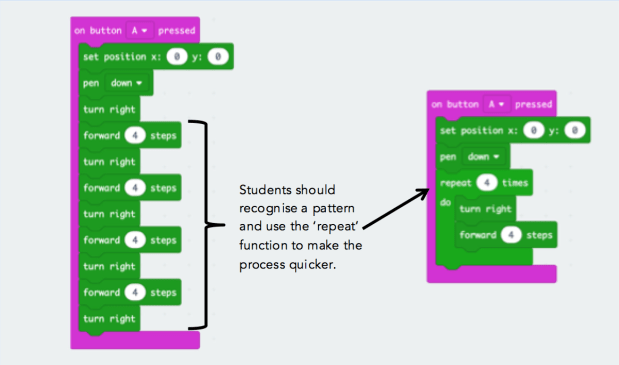
Screen Shot 2019-06-09 at 6.15.10 pm
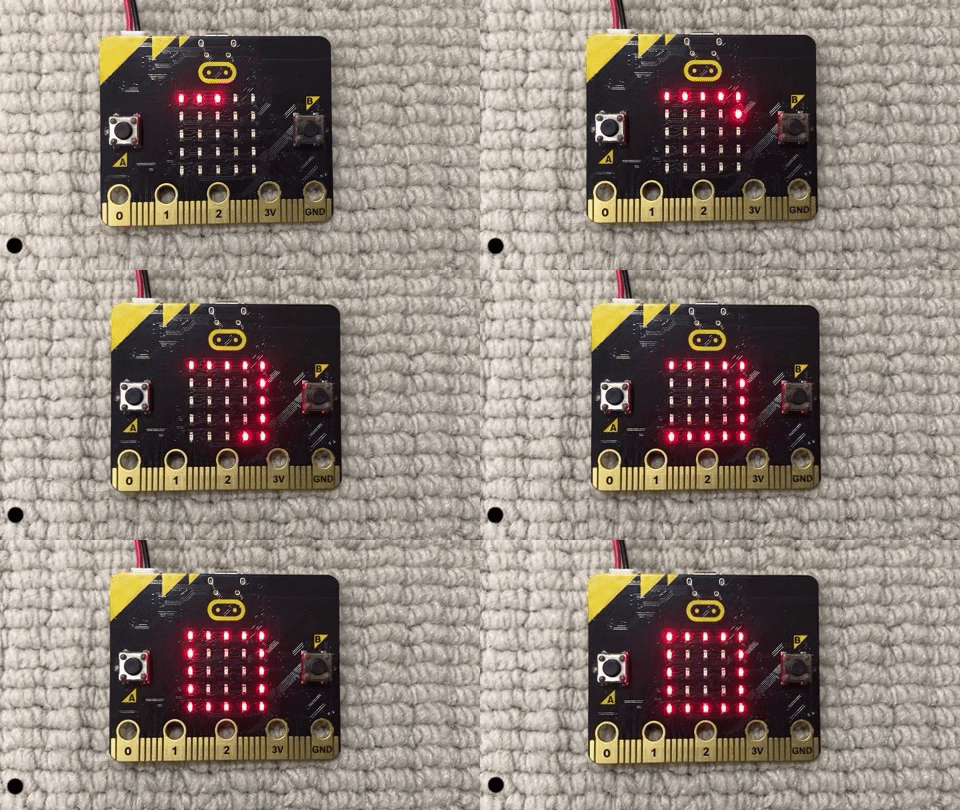
A ‘Turtle’ activity in which students attempt to draw a square using the LED lights on a micro:bit (pictured below). CT concepts include algorithm design and pattern recognition.

microbot gif.gif
The turtle program in action on the micro:bit

There are a few pedagogical considerations for educators in teaching computational thinking across all contexts, including the addressing of misconceptions, selection of resources and applying evidence-supported pedagogical frameworks. The most common misconceptions about CT are that it is simply integrating technologies into the classroom or that it is just teaching students how to code, and these may potentially limit students’ learning (Yadav, Stephenson & Hong, 2017). Because of the wide availability of resources, educators should take extra care in selecting appropriate tools that are accessible, have scope for student growth and support a relationship between CT, curriculum content and tool (Kale et al., 2018). Lee et al., (2011) propose the ‘Use-Modify-Create’ model in which students begin as users of technology, interacting with work created by someone else and iteratively modify that work until they feel comfortable to create their own work. The implementation of this model was linked to deeper engagement, reduced anxiety and an environment supportive of challenge and growth.

Reference List

ACARA. (2014). Australian Curriculum: Digital Technologies (F–10). Retrieved from: https://www.australiancurriculum.edu.au/f-10-curriculum/technologies/digital-technologies/structure/ 

CSTA., & ISTE. (2011). Computational thinking teacher resources (2nd ed.). Retrieved from: https://www.iste.org/explore/Solutions/Computational-thinking-for-all?articleid=152 

Grover, S. (2018). The 5th ‘C’ of 21st century skills? Try computational thinking (not coding. Retrieved from EdSurge News: https://www.edsurge.com/news/2018-02-25-the-5th-c-of-21st-century-skills-try-computational-thinking-not-coding

Kale, U., Akcaoglu, M., Cullen, T., Goh, D., Devine, L., Calvert, N., & Grise, K. (2018). Computational What? Relating Computational Thinking to Teaching. Techtrends62(6), 574-584.

Lee, I., Martin, F., Denner, J., Coulter, B., Allan, W., & Erickson, J. et al. (2011). Computational thinking for youth in practice. ACM Inroads2(1), 32.

Yadav, A., Stephenson, C., & Hong, H. (2017). Computational thinking for teacher education. Communications Of The ACM60(4), 55-62.

Week 3 – Design Thinking: From Conceptualisation to Realisation

Design thinking is the pedagogical approach of encouraging and facilitating students as they carry out the process of design from conceptualisation to realisation and production (IDEO, 2012). One emerging technology that provides students with the opportunity to be designers is the 3D modelling software SketchUp and its capacity for 3D printing.

Design often occurs in response to a problem or need, and this process is outlined in the Science and Technology syllabus outcome ST3-3DP-T, which requires Stage 3 students to define problems, and design, modify and follow algorithms to develop solutions (NSW Education Standards Authority, 2017). The Discovery and Interpretation phases of the IDEO design process encourage students to research and plan their solutions to real-world problems (IDEO, 2012). However, for an authentically meaningful learning experience, educators need to set a design problem within set constraints and provide guidance, reflecting the processes of real designers and architects (Brown, 2012).

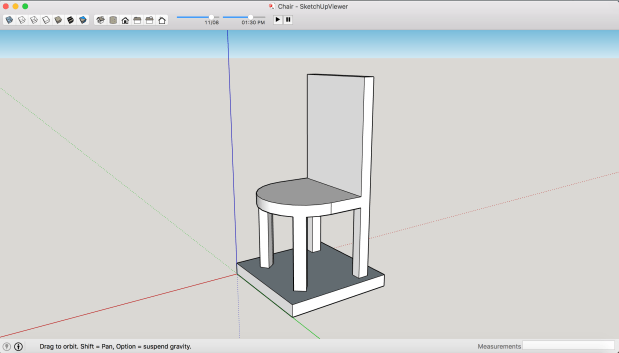
Screen Shot 2019-05-19 at 3.25.20 pm.png
1.1 Chair model made in SketchUp. I looked at current chair designs and measurements as well as measured the LEGO Minifigure to make sure it was in scale.

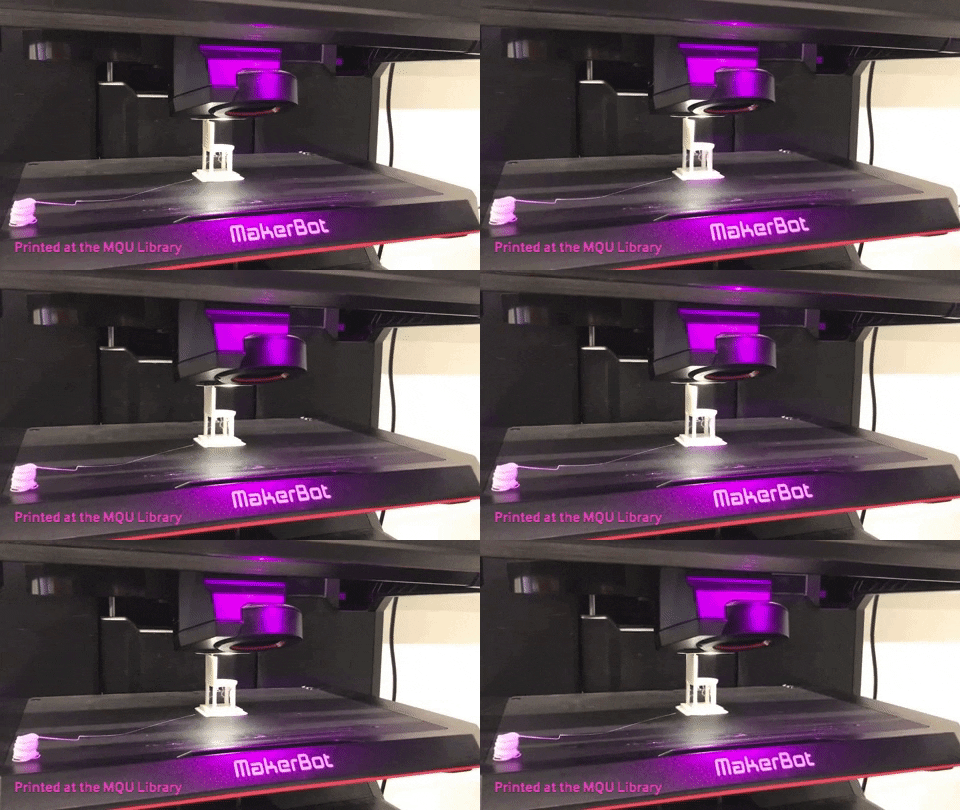
The next two phases of the IDEO design thinking process, Ideation and Experimentation, require students to engage in the formation of ideas and the generation of prototypes such as storyboards, diagrams and models. (IDEO, 2012). SketchUp is a computer-aided design (CAD) program that allows users to easily create 3D models, beyond pen-and-paper drawings because of tools such as the Tape Measure, Push/Pull and Offset, as well as view tools such as Orbit and Pan (Laiserin, 2001). SketchUp has potential for designing new products, buildings or in this example, a chair made to scale to fit a LEGO minifigure with the objective of it being 3D printed.

giphy
1.2 The chair in the process of being 3D printed. 3D printing is a useful tool for making prototypes

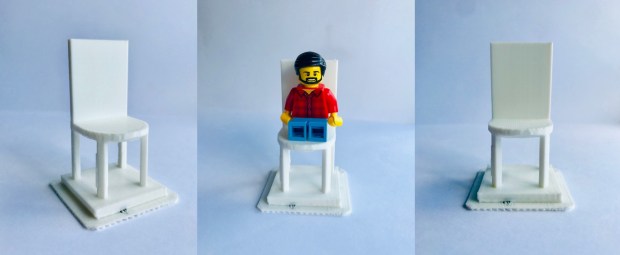
The final phase of the design thinking process is Evolution, in which the students evaluate their products and re-work their designs, if necessary (IDEO, 2012). While the hands-on design and implementation are important processes, reflecting on design strengths and weaknesses are key to the development of critical thinking and confidence (Grammenos & Antona, 2018). Ultimately, design thinking using tools like Sketchup and 3D printing requires students to be empathetic, collaborative and experimental – traits valued in the modern workforce and in life (Brown, 2008).

Lego chair
1.3 Final product of the chair 3D printed. I evaluated its strengths (e.g. the minifigure fits, it is able to stand) and weaknesses (e.g. real chairs don’t have a platform so is there a way to design it to stand without one?)

Reference List

Brown, T. (2008). Design thinking. Harvard Business Review, 86(6), 84-92.

IDEO (2012). Design thinking for educators (2nd ed). Available at: http://designthinkingforeducators.com/

Grammenos, D., & Antona, M. (2018). Future designers: Introducing creativity, design thinking & design to children. International Journal Of Child-Computer Interaction16, 16-24.

Laiserin, J. (2001). SketchUp. Cadence, 16(4), 27.

NSW Education Standards Authority. (2017). Science and technology K-6 syllabus. Retrieved from: https://educationstandards.nsw.edu.au/wps/portal/nesa/k-10/learning-areas/science/science-and-technology-k-6-new-syllabus

Chrome Music Lab: A Learning Technology Critique

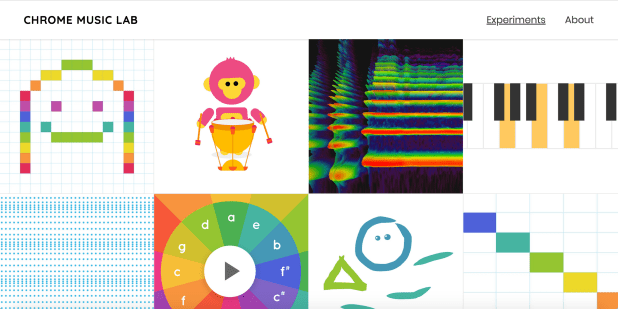
Digital audio editing tools allow users to record and edit vocal tracks, manipulate virtual instruments and, produce music, podcasts and more (Future Music, 2011). Programs like GarageBand (2004) are by no means new, however new iterations such as GarageBand for iOS (2011) and tools such as the Chrome Music Lab (2016), are modernising the ways that digital audio can be edited and created, and incorporated into the classroom. The Chrome Music Lab is a suite of ‘experiments’ that is accessible online, which are designed to teach musical concepts in a hands-on way.

Screen Shot 2019-03-11 at 7.58.52 PM
Experiments from the Chrome Music Lab

The first suggestion for the use of the Chrome Music Lab in the classroom is to use the Song Maker tool in providing younger students with the opportunity to become composers of their own music. The Creative Arts syllabus emphasises the way that organising and creating sound can allow for self-expression of emotion and imagination (Board of Studies, 2006). Song Maker has features such as a clean user interface and share functionality that facilitate the creative process of song composition. While easy to use for children from K-4, this may limit its use for older children and for more complex projects, as it does not have features such as voice recording and layering of instruments.

One alternative to offset the limitations of the Song Maker tool is Garageband for iOS which can be used to create more complex audio projects to complement other work. Some examples of project ideas that can be made with Garageband for iOS are soundtracks for a game or movie project, songs conveying information about a specific content point (e.g. Epic Rap Battles of History), podcasts and radio jingles. This iteration of GarageBand now available on tablets and phones is portable, simple to use on a touch screen and, has a larger selection of instruments and sound effects, all of which remove the parameters of music composition to foster creativity and expression (Thompson, 2012).

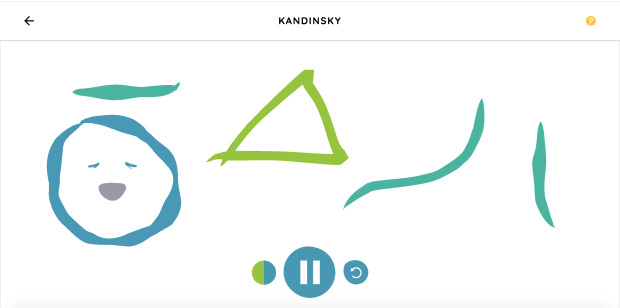
Additionally, the Chrome Music Lab has 13 tools that can all be used to enrich the learning of concepts from other KLAs in unique ways. For example, the Kandinsky tool allows students to draw shapes that make a corresponding sound, aligning principles of music with visual arts concepts like line and direction (Dinham, 2016). Other examples are the Spectrogram tool which visually represents sound frequencies and the Rhythm tool which can be used to teach fractions, by manipulating the beats per bar. The main pedagogical implication is that these tools are only limited in their capabilities, so it is recommended to use them in the preparatory stages of creative learning as they don’t provide much opportunity for divergent thinking (Wheeler, Waite & Bromfield, 2002).

Screen Shot 2019-03-11 at 10.43.37 PM
Example of the Kandinsky tool from the Chrome Music Lab

References

Board of Studies. (2006). Creative Arts K-6 Syllabus. Sydney.

Dinham, J. (2016). Delivering Authentic Arts Education (3rd ed., pp. 246-281). Melbourne: Cengage Learning Australia.

Future Music. (2011). A brief history of GarageBand. Retrieved from https://www.musicradar.com/tuition/tech/a-brief-history-of-garageband-400471

Thompson, D. (2012). Music Technology and Musical Creativity. General Music Today25(3), 54-57. doi: 10.1177/1048371311434639

Wheeler, S., Waite, S., & Bromfield, C. (2002). Promoting creative thinking through the use of ICT. Journal Of Computer Assisted Learning18(3), 367-378. doi: 10.1046/j.0266-4909.2002.00247.x

All screenshots taken from the Chrome Music Lab. All videos are my own work.